Key takeaways
- PDF defines no global compression setting. Compression is declared per stream, by the /Filter and /DecodeParms keys of that stream's own dictionary (ISO 32000-1, clause 7.4).
- The filters are borrowed standards — ITU-T T.6, T.81 and T.88, ISO/IEC 15444, IETF RFC 1950 and 1951. What PDF adds is per-object declaration — each stream names its own filters — not the codecs themselves.
- ASCIIHexDecode and ASCII85Decode are routinely listed as compression filters. They expand the data: they are 7-bit-safe transport encodings inherited from PostScript.
- Compression of the file's own bookkeeping — object streams and cross-reference streams — arrived only with PDF 1.5, so size comparisons have to name a version.
- Linearisation (Annex F) is a structural rearrangement, not compression, and usually makes a file slightly larger.
A stream, a dictionary, and two keys
A PDF file is a collection of numbered objects. Anything with bulk — page content, image XObjects, embedded font programs, ICC profiles, XMP metadata, and from PDF 1.5 the cross-reference data itself — is stored as a stream object: a dictionary followed by a run of raw bytes. The dictionary carries a /Length, and optionally a /Filter naming one filter or an array of filters to be applied in order, and a /DecodeParms carrying the parameters each of those filters needs. A consumer reads the dictionary, applies the named decode filters in sequence, and recovers the original bytes.
There is nowhere in the file to record a document-wide compression level, because no such concept exists in the format. This is not a pedantic distinction: it is why two visually identical documents can differ by an order of magnitude, why "reduce file size" commands behave unpredictably across files, and why the question "what compression does this PDF use" usually has several correct answers at once — one per stream.
| Filter | What it is | Availability and constraints |
|---|---|---|
| FlateDecode | A zlib stream (IETF RFC 1950) wrapping DEFLATE (RFC 1951). Lossless, general purpose. | Permitted from PDF 1.2. The Library of Congress format description calls it the most commonly used method to compress the text content of PDFs. |
| LZWDecode | Lempel-Ziv-Welch coding, lossless and general purpose. | Present since the format's early versions and the reason PDF was entangled with the Unisys LZW patents. Defined in ISO 32000-1 clause 7.4; whether later revisions formally deprecate it is a question for the standard's own text, but it has certainly not been deleted and readers still decode it. |
| CCITTFaxDecode | The facsimile coding schemes of the ITU-T T-series, selected by the /K parameter — Group 3 one- and two-dimensional coding, and Group 4 (ITU-T T.6) for /K less than zero. | Defined for 1 bit per pixel image data only. |
| JBIG2Decode | Bi-level image coding per ITU-T T.88 and its ISO/IEC twin. | From PDF 1.4. The Library of Congress specifies ISO/IEC 14492:2001 with amendments 1 and 2 but excluding amendment 3, and 1 bit per pixel. |
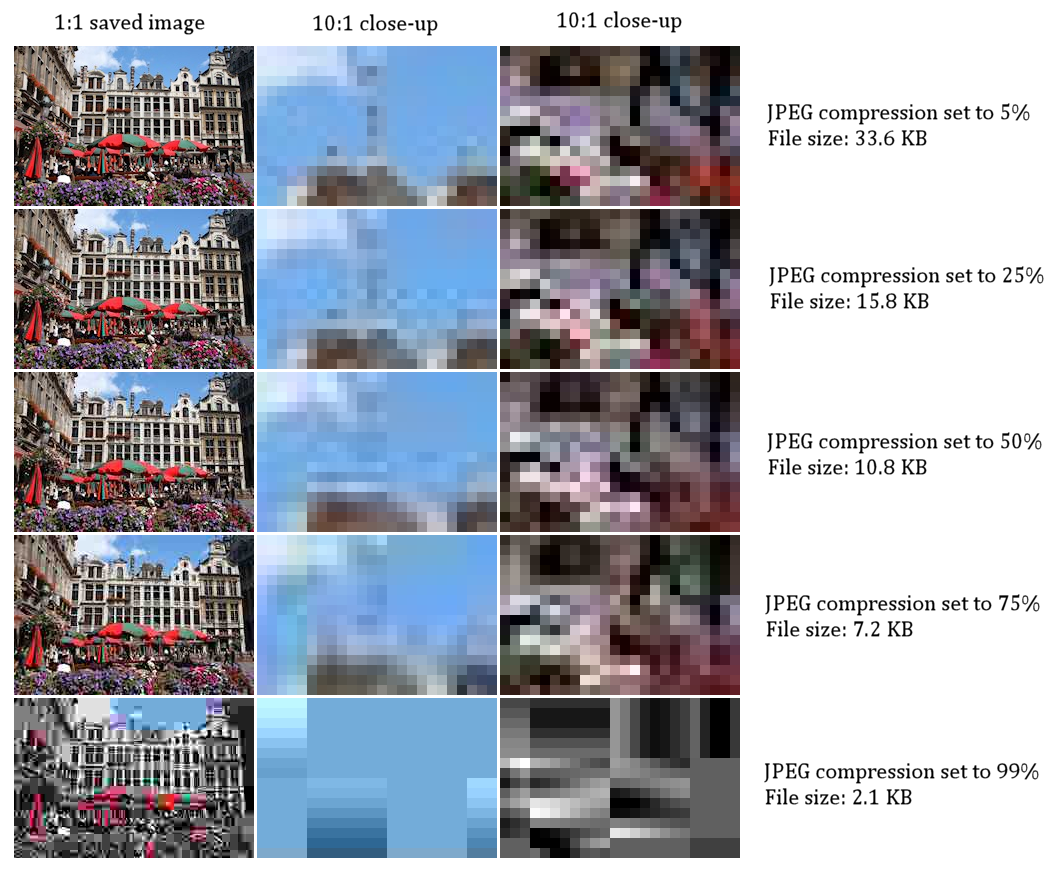
| DCTDecode | A JPEG entropy-coded datastream per ITU-T T.81. Lossy. | Baseline JPEG in all versions; progressive JPEG accepted from PDF 1.3. |
| JPXDecode | JPEG 2000 data in the JPX structure of ISO/IEC 15444-2, with restrictions imposed by PDF. | From PDF 1.5. Supports lossless and lossy modes. |
| RunLengthDecode | Simple run-length coding. A genuine but weak compressor. | Effective only on data with long literal runs; on photographic data it can expand the stream. |
| ASCII85Decode | A base-85 ASCII representation inherited from PostScript. Not a compressor. | Expands the data, roughly five bytes out for every four in. |
| ASCIIHexDecode | Hexadecimal ASCII representation. Not a compressor. | Expands the data roughly two to one. |
| Crypt | The hook for encryption handlers rather than an encoding in the size sense. | Interacts with the file's security handler, not with its bulk. |
Sources: ISO 32000-1:2008, clause 7.4 (Adobe's free normative copy); Library of Congress, Sustainability of Digital Formats, PDF family (fdd000030)
Borrowed codecs, inherited plumbing
None of the compression in a PDF was designed for PDF. Group 4 coding came from facsimile, where ITU-T T.6 had been in force for years before the format existed. DCTDecode carries the JPEG datastream of ITU-T T.81, JBIG2Decode carries ITU-T T.88, JPXDecode carries JPEG 2000 from ISO/IEC 15444, and FlateDecode carries zlib and DEFLATE from two IETF RFCs. Crediting any single person or company with inventing PDF compression misreads the architecture. The plumbing has an inheritance of its own: PostScript already used named filters, and the ASCII transport encodings in clause 7.4 came across from it directly. What PDF did was carry that filter mechanism into a random-access object format, where every stream declares its own encoding and hands a decoder the parameters it needs, rather than inheriting a setting from the document around it.
Two naming traps follow. FlateDecode is not ZIP — the filter decodes a zlib wrapper around the DEFLATE algorithm, not the PKZIP archive container, whatever product interfaces label it. And DCTDecode does not embed a JPEG file: it embeds a JPEG entropy-coded datastream inside a PDF image XObject, with no JFIF wrapper, and the colour space, bit depth and pixel dimensions read from the PDF dictionary rather than from the image data. The same applies to JPXDecode, which is the JPX structure of ISO/IEC 15444-2 under PDF-imposed restrictions, not a JP2 file pasted into the document.

Version is not a detail
Because filters were added over time, the version recorded in a file determines what its producer was even allowed to do. Any statement of the form "PDFs are compressed by default" is anachronistic without a version attached.
Earliest versions
No FlateDecode. LZWDecode is the general-purpose lossless option, the ASCII filters handle transport, and the cross-reference table is a fixed-width, uncompressed ASCII list.
PDF 1.2
FlateDecode becomes permitted — zlib per RFC 1950 wrapping DEFLATE per RFC 1951. The Library of Congress describes it as the most commonly used method to compress the text content of PDFs.
PDF 1.3
DCTDecode, which had always accepted baseline JPEG, is extended to progressive JPEG.
PDF 1.4
JBIG2Decode arrives for bi-level images at 1 bit per pixel, referencing ISO/IEC 14492:2001 with amendments 1 and 2 and excluding amendment 3.
PDF 1.5
JPXDecode adds JPEG 2000. More consequentially for size, object streams (7.5.7) and cross-reference streams (7.5.8) let the file compress its own object and cross-reference machinery for the first time.
PDF 1.7 / ISO 32000-1:2008
PDF 1.7 is fast-tracked into ISO by TC 171/SC 2 from Adobe's PDF Reference sixth edition, moving the normative text from a vendor reference to an ISO standard.
PDF 2.0 / ISO 32000-2
A revised standard, second edition dated 2020, with its own published errata.
The second layer: compressing the file's own bookkeeping
The classic cross-reference table is a plain-text index: one fixed-width entry per object, each giving a byte offset into the file. It is human-readable, robust, and completely uncompressed, and in a document made of many small objects — tagged structure, annotations, form fields, link destinations, outline entries — the bookkeeping can be a surprisingly large fraction of the total. From PDF 1.5, object streams pack many non-stream objects into a single stream that can itself be Flate-encoded, and cross-reference streams replace the ASCII table with a compressed binary stream. For structure-heavy documents this is often the largest single saving available, and it touches no image at all.
Linearisation is structure, not compression
Linearised PDF is defined in a normative annex — Annex F — and does something orthogonal to encoding. The objects needed to render the first page move to the front of the file and hint tables are added, so a viewer fetching the document over a slow link can display page one from a prefix of the bytes instead of waiting for the trailer to locate the catalogue. The cost is duplication plus the hint tables, which is why a linearised file is usually slightly larger. Precision matters here because product menus place "Fast Web View" next to "Reduce File Size" and write-ups then treat them as one operation: the first is a normative structural property of the format, the second a vendor feature that re-encodes content.
What an exporter actually did to your file
The format permits; the exporter decides. The clearest public record of how an exporter of this lineage behaves is the documentation for Ghostscript's pdfwrite device, which adopted Distiller's parameter names and publishes their per-preset defaults; Adobe's own Acrobat and PDF Library SDK documentation covers the manufacturer side.
| Parameter | What it controls | Effect on the resulting file |
|---|---|---|
| EncodeColorImages / AutoFilterColorImages | Whether images are re-encoded at all, and whether the exporter picks the filter itself. | Turning automatic filter selection on hands the lossy/lossless decision to a heuristic rather than to you. |
| ColorImageFilter | The filter written into the image stream's dictionary; /DCTEncode by default. | A default re-encode to JPEG is lossy even when pixel dimensions are unchanged, and repeated round-trips compound the loss. |
| DownsampleColorImages / ColorImageDownsampleType | Whether to reduce pixel dimensions, and by which method — /Subsample, /Average or /Bicubic. | Downsampling happens before encoding and is not a PDF filter at all; it changes the pixels the filter then compresses. |
| ColorImageResolution | The target resolution in pixels per inch. Documented preset defaults run from 72 ppi at the screen end through 150 ppi to 300 ppi for print and prepress work. | Usually the single largest lever over size in an image-heavy document. |
| ColorImageDownsampleThreshold | Documented default 1.5. An image is left alone unless its input resolution exceeds the target multiplied by the threshold. | At a 72 ppi target, nothing below 108 ppi is downsampled — which is why a "screen" preset sometimes changes almost nothing. |
| MonoImageFilter | The filter used for 1-bit images. | This is where CCITTFaxDecode and JBIG2Decode territory is decided for scanned bitonal pages. |
| CompressPages / UseFlateCompression / LZWEncodePages / ASCII85EncodePages | How page content streams themselves are encoded. | Content streams are usually a small share of an image-heavy file and a large share of a text-heavy one. ASCII85 wrapping expands rather than reduces. |
| EmbedAllFonts / SubsetFonts / MaxSubsetPct | Font embedding and subsetting policy. MaxSubsetPct carries a documented default of 100 in the pdfwrite documentation. | Embedding adds bulk for fidelity; subsetting may or may not remove much of it. |
| CompatibilityLevel | The PDF version written to the output. | Decides whether object streams and cross-reference streams are available at all — a size decision that has nothing to do with images. |
Sources: Ghostscript documentation, "The pdfwrite device" (VectorDevices); Adobe Acrobat-PDFL SDK, PDF File Creation documentation
Fonts deserve their own caution, because the intuition that subsetting shrinks files is only sometimes true. Embedding a font program (as FontFile, FontFile2 or FontFile3, depending on the font technology) buys fidelity at the cost of bulk. Subsetting removes unused glyphs — but it also defeats reuse across a set of documents, since each file then carries its own partial copy of a face rather than sharing one. Ghostscript's pdfwrite device documents a MaxSubsetPct default of 100 precisely because a subset can end up no smaller than the whole face. Aggressive subsetting of CID-keyed fonts is also a known cause of broken text extraction and search; the archival consequences of that belong with PDF/A rather than here.
Diagnosing a large file
Find out where the bulk actually is
Any tool that lists objects with their /Filter and /Length answers this directly. The answer is images, embedded fonts, or structure — and which one it is changes every subsequent decision.
Read the version before comparing anything
A file written at a low compatibility level has no object streams and no cross-reference streams, so much of its bookkeeping is uncompressed by necessity rather than by choice. Comparing it against a modern file compares two different formats.
Separate downsampling from re-encoding
Reducing pixel dimensions and changing the filter are different operations with different failure modes. A re-encode to a lossy filter degrades the image even at identical dimensions, and successive exports compound that loss.
Match the filter to the content type
CCITTFaxDecode and JBIG2Decode are defined for 1-bit data; DCTDecode and JPXDecode for continuous tone. Encoding a scanned bitonal page as JPEG, or a photograph as Group 4 fax data, is the common and expensive mistake.
What the format permits versus what your file says
Reading PDF this way converts an unanswerable question into a series of answerable ones. Which streams dominate this file? Which filter is named on each? What version is it, and does it therefore have object streams at all? Were the images downsampled, re-encoded, or both — and at what target resolution and threshold? Was each font embedded whole or subset? Is the file linearised, and was that intentional? Every one of those has a definite answer recorded in the bytes, which is more than can be said for "what compression level was used".
None of those answers live in a preferences pane, and none can be set once for a document. They are properties of individual objects — a stream's encoding, an image's pixel dimensions, a font's embedding, the compatibility level the file was written at, whether it was linearised or not — written by whichever program produced the file. Changing any of them deliberately is the work of a tool that rewrites an existing file, which is the general category a PDF editor or converter belongs to. Knowing what those operations are called in the format turns a single opaque "optimise" button into choices you can make on purpose, and lets you tell afterwards which of them were actually applied.
Frequently asked questions
- Is FlateDecode the same thing as ZIP compression?
- Not as a file format. FlateDecode decodes a zlib stream (IETF RFC 1950) wrapping the DEFLATE algorithm (RFC 1951) — the same algorithm the ZIP archive format commonly uses, but not the PKZIP container. Product interfaces have historically labelled it "ZIP", which is where the confusion comes from. It is permitted from PDF 1.2 onward, and the Library of Congress format description calls it the most commonly used method to compress the text content of PDFs.
- Does ASCII85 encoding make my file smaller?
- No — it makes it larger, roughly five bytes out for every four in, and ASCIIHexDecode roughly doubles the data. Both are 7-bit-safe transport encodings inherited from PostScript, intended for paths that could not carry arbitrary binary. They appear on lists of PDF compression filters because they appear in clause 7.4 alongside the real compressors, not because they compress.
- Why did linearising my PDF make it bigger?
- Because linearisation is a structural rearrangement rather than a compression step. The normative annex that defines it moves first-page objects toward the front and adds hint tables so a viewer can render page one from a prefix of the file; the duplication and the hint tables both cost bytes. What it buys is time-to-first-page over a slow link, not a smaller file.
- Does subsetting embedded fonts always reduce size?
- No. Ghostscript's pdfwrite device documents a MaxSubsetPct default of 100 precisely because a subset can end up no smaller than the complete face. Subsetting also defeats sharing a single embedded face across a set of related documents, since each file then carries its own partial copy, and aggressive subsetting of CID-keyed fonts is a known cause of broken text extraction and search.
- Can I just set a compression level for the whole document?
- There is no such setting in the format. What an application labels a compression level or a preset is a bundle of per-stream decisions — which filter to apply to colour images, which to bitonal images, what resolution to downsample to, whether to re-encode content streams, whether to embed and subset fonts, and which PDF version to write. The file records the outcome of each decision, never the preset that produced it.
Source transparency (14 sources)
These references support claims made in this entry. The archive uses verified institutional and public-domain sources only; see Source policy.
Sources consulted (14)
- ISO 32000-1:2008, Document management — Portable document format — Part 1: PDF 1.7 (Adobe's free normative copy) — Adobe Systems / ISO TC 171 SC 2
- ISO 32000-2:2020 — Document management — Portable document format — Part 2: PDF 2.0 — International Organization for Standardization
- PDF (Portable Document Format) Family — Sustainability of Digital Formats (fdd000030) — Library of Congress
- RFC 1950: ZLIB Compressed Data Format Specification version 3.3 — IETF / RFC Editor
- RFC 1951: DEFLATE Compressed Data Format Specification version 1.3 — IETF / RFC Editor
- ITU-T Recommendation T.6 — Facsimile coding schemes and coding control functions for Group 4 facsimile apparatus — ITU-T
- ITU-T Recommendation T.81 — Information technology: Digital compression and coding of continuous-tone still images — ITU-T
- ITU-T Recommendation T.88 — Information technology: Lossy/lossless coding of bi-level images (JBIG2) — ITU-T
- The pdfwrite device — Ghostscript VectorDevices documentation — Artifex Software / Ghostscript project
- Acrobat-PDFL SDK Documentation — PDF File Creation (Acrobat Distiller settings) — Adobe
- Errata for PDF specifications — Clause 7 (Syntax), ISO 32000-2:2020 — PDF Association
- Errata for PDF specifications — Annex F (normative) Linearized PDF — PDF Association
- The Camelot Project (John Warnock) — full paper text — John Warnock / Adobe Systems (mirrored copy)
- Oral History of John Warnock, part 2 of 2 (interviewed by David C. Brock, 2018; CHM Ref X8536.2018) — Computer History Museum
Continue in the archive
Related reading
Tools
ISO 32000 (PDF)
ISO 32000 is the ISO standard for the Portable Document Format (PDF): its history, structure, print pipeline role, and PDF 1.7 vs PDF 2.0.
Guides · Advanced
Compression Before OCR
How lossless, lossy, and layered image compression is applied to scanned pages before OCR, and why the choice affects recognition fidelity.
Tools
PDF/A
PDF/A (ISO 19005) is the archival subset of PDF for long-term preservation, using embedded fonts, device-independent color, and standardized metadata.
Tools
PostScript
PostScript is Adobe's device-independent page-description language and stack-based programming language that launched desktop publishing in the 1980s.
Modern tools
Contemporary apps for the same task, published by HELPERG LLC — the publisher of this archive.

PDF Editor & Convert
Edit, convert, combine, and OCR PDF documents.