Overview
An automatic document feeder (ADF) is the mechanical subsystem of a scanner, photocopier, fax machine, or multifunction printer (MFP) that takes a stack of loose sheets and feeds them one at a time past the imaging sensor, so a multi-page document can be captured without the operator placing each sheet by hand.
An ADF is the counterpart to the flatbed platen — the fixed glass on which a single page or a bound book is laid. Where a flatbed moves the sensor under a stationary page, an ADF holds the sensor stationary and moves the paper past it. Many devices combine both: a flatbed base with an ADF built into the lid. The two are exposed to software as distinct scan sources.
Two figures of merit are commonly quoted: pages per minute (ppm) for one-sided throughput and images per minute (ipm) for the number of sides (images) captured per minute, which matters for two-sided (duplex) scanning where each sheet yields two images. Feed-stack capacity varies widely by class of device, from roughly ten sheets on consumer MFP lids to a hundred or more on production document scanners.
History
The ADF grew out of office-copier document handling in the 1970s and 1980s, before desktop image scanners were common. The mechanically demanding version — a recirculating document handler (recirculating ADF), which feeds an entire set of originals past the exposure station, returns them to the tray, and can feed the set repeatedly for collated, multi-copy, or duplex copying — is documented in period patents.
One verifiable example is IBM's European patent application EP0034269, "Recirculating document feeder" (priority 19 February 1980, filed 23 January 1981, published 6 January 1982), which describes automatically feeding and repositioning original documents through an exposure station repeatedly.
Widely repeated popular histories credit early Xerox copiers with pioneering built-in document handling, and sometimes with the "first" ADF. These specific attributions are not confirmed here from a primary source and are therefore not asserted. What is well supported is that recirculating and automatic document handling was an established copier technology by the early 1980s, and that the same feed-and-separate mechanics were later miniaturized for desktop and production document scanners and for fax machines.
How it works
A sheet moving through an ADF passes through three functional stages.
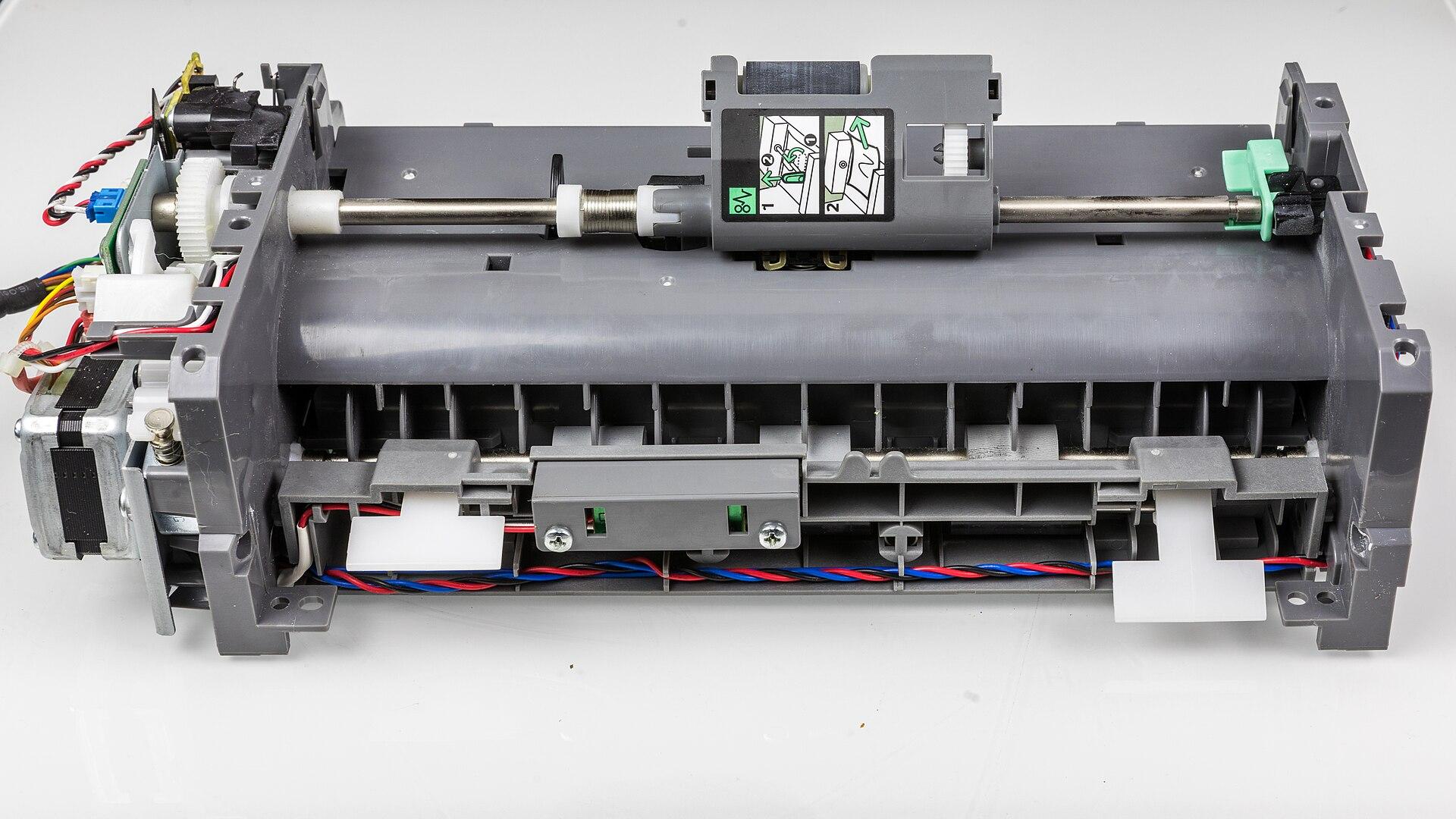
1. Pick / feed. A pick roller (feed roller) presses on the top of the stack and rotates to draw the topmost sheet forward into the paper path. Friction between the roller and the paper must exceed the friction between sheets so the top sheet moves while the ones beneath tend to stay.
2. Separation. Because pick friction alone often drags several sheets at once, a dedicated separation stage ensures only one sheet advances. Two friction geometries dominate:
- Separation pad (friction pad): a stationary high-friction pad pressed against the feed roller; the roller pulls the top sheet through while the pad holds back any extra sheets. Ricoh's own maintenance documentation for MFPs refers explicitly to cleaning "the Paper Feed Roller or Friction Pad of the ADF."
- Retard roller (reverse / torque-limited roller): a roller positioned opposite the feed roller that is held stationary or actively driven backward through a torque limiter. A single sheet slips past it, but if two sheets enter the nip, the retard roller drives the lower sheet back, separating them. This mechanism is documented in patent literature such as US 8,348,257 ("Retard roller and retard roller module having such retard roller") and general sheet-separating-device patents such as US 4,822,021 ("Sheet separating device").
The controlling principle in both designs is a friction hierarchy: feed-roller-to-paper friction exceeds paper-to-paper friction, and pad/retard-to-paper friction also exceeds paper-to-paper friction, so exactly one sheet is admitted per cycle.
3. Transport and imaging. Transport rollers move the isolated sheet at a controlled speed past the imaging station, where a contact image sensor (CIS) or CCD array reads a line at a time; the sheet's motion supplies the second (page-length) dimension of the image. Additional rollers and an exit tray eject the scanned sheet. Skew correction, page-edge detection, and optionally multi-feed sensing occur along this path.

Architecture
Typical ADF building blocks:
- Input tray / hopper with paper guides and a stack sensor that tells the driver whether documents are loaded.
- Pick roller that initiates feed from the top of the stack.
- Separation stage — a separation pad, or a feed-roller-and-retard-roller pair.
- Transport rollers that carry the sheet at constant velocity through the scan zone.
- Imaging station(s) — one sensor for simplex; one or two for duplex.
- Sensors — paper-present, page-edge/leading-edge, skew, and optional ultrasonic multi-feed transducers.
- Exit rollers and output tray — some recirculating handlers return sheets to the input tray instead.
The pick roller, feed roller, and separation pad or retard roller are consumables. Manufacturers publish duty-cycle-based replacement intervals and sell roller and pad exchange kits because their rubber surfaces glaze and lose the friction the separation hierarchy depends on.
Simplex vs. duplex. A simplex ADF scans only one side of each sheet per pass. A duplex ADF captures both sides, using one of two architectures:
- Reversing ADF (RADF). A single imaging sensor scans the front; the transport then pulls the sheet back, flips it, and re-feeds it to scan the back. It needs only one sensor but pays in speed and mechanical complexity — an extra reversing path and more chances to jam or mis-order pages.
- Single-pass duplex (dual-CIS). Two imaging sensors are placed on opposite sides of the paper path, one above and one below, so both faces are read in a single pass with no flipping. This maximizes throughput and reduces page-handling risk at the cost of a second sensor and its calibration. Modern desktop and production document scanners overwhelmingly use this approach.
Both duplex designs are rated in ipm because each sheet yields two images. The trade-off is direct: the reversing ADF minimizes optics cost at the expense of throughput and reliability on two-sided originals, while the dual-CIS design maximizes throughput at the expense of a second sensor.
Multi-feed (double-feed) detection. When two or more sheets slip through the separation stage together, a page is missed — unacceptable for records, checks, or legal documents. The dominant detection method is ultrasonic double-feed detection: an ultrasonic transmitter on one side of the paper path and a receiver on the other. A single sheet attenuates the ultrasound in a characteristic way; two overlapping sheets, with an air gap between them, attenuate it much more, and the receiver flags the anomaly so the scanner can stop and alert the operator. Component makers build dedicated transducers for this job — Murata, for example, markets high-frequency ultrasonic sensors for double-feed detection in scanners, printers, and ATMs. A key advantage of the ultrasonic method is that it is insensitive to ink, print density, paper color, ambient light, and even transparencies, because it measures acoustic transmission rather than optical properties. Patent literature such as US 11,027,934 ("Multi-feed detection device, multi-feed detection method, and electronic device") documents the signal-processing side. Some drivers also use page-length cross-checks — comparing measured page length against the expected page size to catch overlaps — as the SANE sane-fujitsu backend notes that its page-width and page-height settings serve both ADF centering and double-feed detection.
Processing pipeline
A representative ADF scan flow:
1. The operator loads the stack; the paper-present sensor reports documents ready. 2. The host application selects a source (flatbed vs. ADF/feeder) and a mode (simplex vs. duplex), plus resolution, color mode, and page size, through a scanning API (TWAIN, WIA, SANE, ImageCaptureCore, or eSCL). 3. The pick roller feeds the top sheet; the separation stage guarantees a single sheet. 4. Leading-edge and skew sensors register the page; an optional ultrasonic sensor watches for multi-feed. 5. The sheet transports past the imaging station(s) — one image for simplex, two for duplex. 6. Firmware or driver performs image processing: deskew, auto-crop to page edges, blank-page detection and removal, background/bleed-through suppression, and often automatic blank-back suppression in duplex. 7. The sheet ejects and the loop repeats until the tray empties or the requested page count is reached. 8. Captured images are assembled into a multi-page container — very commonly PDF — or individual files, frequently with an OCR text layer added downstream.
Advantages
- Unattended multi-page capture — the operator loads a stack and walks away; the defining benefit over the flatbed.
- Throughput — sustained ppm and ipm rates far above hand-placing pages; single-pass duplex roughly doubles two-sided throughput versus reversing designs.
- Consistency — controlled transport speed and fixed optics geometry give uniform page framing and exposure across a batch.
- Automation-friendly — page-count control, blank-page removal, and multi-feed alarms make ADFs the basis of batch and back-office document workflows.
Limitations
- Media constraints — ADFs handle loose, reasonably flat, undamaged sheets within a supported weight and size range. Bound books, fragile or torn originals, photographs, glued or stapled sets, extreme thin, thick, or textured stock, and irregular sizes are better handled on a flatbed.
- Jams and mis-picks — every added roller, and in reversing ADFs the flip path, is a jam opportunity; worn pick rollers or separation pads cause mis-picks and multi-feeds.
- Consumable wear — pick and feed rollers and separation pads or retard rollers glaze and must be cleaned and periodically replaced to maintain the friction hierarchy.
- Skew and ordering — sheets can enter at an angle, needing deskew, and reversing ADFs can mis-order or mis-pair front and back images if the flip mis-times.
- Delicate or valuable originals — the mechanical grip and bending risk damage; archival and rare-material digitization typically avoids ADFs in favor of flatbeds or overhead scanners.
Relationship to PDF
The ADF's natural output is a multi-page document, and PDF — with its archival subset PDF/A — is the dominant container for it: a batch of fed sheets becomes an ordered set of page images wrapped in one file, usually with a searchable OCR text layer added after capture.
Duplex ADF scanning maps cleanly onto PDF's page model (front, back, front, back), and driver-side blank-page suppression prevents empty backs from producing empty PDF pages. The ADF is the capture stage and PDF is the packaging stage — the ADF does not itself define PDF, but the two are paired constantly in document management.
Relationship to printers
ADFs are most visible on multifunction printers and copiers, where the same feeder serves copy, scan, and fax paths. On copiers the ADF is what enables automatic two-sided copying and multi-copy collation — the historical recirculating document handler existed precisely to feed a set of originals repeatedly for collated and duplex copy jobs.
The print engine and the ADF are distinct subsystems: the print engine draws from paper cassettes and marks blank stock, while the ADF moves originals past the scan bar. They share the device chassis, control panel, and firmware, and network scan and print are exposed together over the same connection (for example, via IPP and eSCL).
Relationship to workflows
The ADF is the front door of most document-capture and back-office workflows: high-volume scanning of invoices, forms, contracts, and records depends on unattended feeding plus the automation features built around it — batch separation (patch codes or barcode separator sheets), blank-page removal, auto-deskew and auto-crop, and multi-feed alarms that stop the batch before a page is silently lost.
Command-line and server tools reflect this. SANE's scanadf is designed to pull page after page from the feeder until it reports end-of-feed, and source and duplex options exist specifically to script feeder behavior.
Relationship to standards
ADF behavior is a first-class concept in every major scanning standard.
- TWAIN (TWAIN Working Group) exposes the feeder through capabilities such as CAP_FEEDERENABLED (route paper past the scan bar rather than moving the bar over the platen), CAP_AUTOFEED (auto-advance to the next sheet after each page, which requires the feeder enabled), and CAP_DUPLEX (reporting no duplex, single-pass duplex, or two-pass duplex). The single-pass versus two-pass distinction is explicit in the standard.
- ISIS (originally from Pixel Translations, now Open Text) is a competing high-volume scanner interface used heavily in production document capture, where ADF batch features matter most.
- PWG / IPP and eSCL (Mopria's driverless network scanning protocol) define input sources explicitly. The eSCL protocol's input-source capabilities enumerate Platen, ADF (Feeder), and ADF Duplex through separate capability structures, and scan settings carry an InputSource (Platen or Feeder) plus a Duplex boolean. This is what lets a driverless client scan simplex or duplex from the ADF over the network, and over USB via IPP-over-USB. The open-source sane-airscan project is a reference implementation.
Relationship to operating systems
Every desktop OS models the ADF explicitly.
- Windows (WIA). On modern Windows (WIA 2.0, Windows Vista and later) the source — feeder versus flatbed — is selected through the WIA item tree rather than through source flags: the FEEDER (0x001) and FLATBED (0x002) flags on WIA_IPS_DOCUMENT_HANDLING_SELECT are legacy (WIA 1.0 / Windows XP) and obsolete on Vista and later. Duplex handling is still controlled by that property's DUPLEX flag together with FRONT_ONLY, BACK_ONLY, FRONT_FIRST, and BACK_FIRST for page ordering. Microsoft's WIA item-tree model represents the two sides of a duplex feed as separate child items categorized WIA_CATEGORY_FEEDER_FRONT and WIA_CATEGORY_FEEDER_BACK.
- macOS (ImageCaptureCore). Apple represents the feeder as ICScannerFunctionalUnitDocumentFeeder, a concrete ICScannerFunctionalUnit subclass alongside flatbed and transparency units, with a supportsDuplexScanning flag, a settable duplexScanningEnabled, and a read-only documentLoaded indicator.
- Linux/Unix (SANE). Backends expose a source option — the sane-fujitsu backend, for instance, offers Flatbed, ADF Front, ADF Back, and ADF Duplex (plus card equivalents) — along with page-size options used both for centering and for double-feed detection, and the end-of-feed status that batch tools rely on to know when the tray is empty.
Modern relevance
ADFs remain central wherever paper still enters digital systems: accounts-payable and forms processing, healthcare and legal records, KYC and onboarding, and general office digitization.
The prevailing hardware pattern is the single-pass dual-CIS duplex ADF with ultrasonic multi-feed detection, paired with driverless network scanning (eSCL/IPP) so no vendor driver is required. Even as electronic documents reduce raw paper volume, the ADF persists as the standard bridge between physical originals and searchable PDF and document-management systems, and its APIs — TWAIN, WIA, SANE, ImageCaptureCore, and eSCL — continue to treat "feeder, simplex/duplex" as fundamental scan parameters.
Timeline
1980–1982
IBM's "Recirculating document feeder" patent EP0034269 (priority 19 Feb 1980, filed 23 Jan 1981, published 6 Jan 1982) documents automatic recirculating document handling for copying and scanning.
1980s
Friction-based sheet-separation mechanisms (separation pad and retard-roller designs) documented in patents such as US 4,822,021 ("Sheet separating device," Eastman Kodak).
1990s onward
ADF handling formalized in host scanning standards: TWAIN feeder, duplex, and auto-feed capabilities; Windows WIA feeder and duplex properties.
2010s
Driverless network scanning standardizes ADF and ADF-Duplex sources via eSCL (Mopria) and PWG IPP Scan.
2010s–present
Retard-roller and ultrasonic multi-feed refinements documented in patents such as US 8,348,257 (retard roller, Primax) and US 11,027,934 (multi-feed detection, Seiko Epson), with productized ultrasonic transducers for double-feed sensing.
Frequently asked questions
- What is an ADF scanner?
- An automatic document feeder (ADF) is the mechanical subsystem of a scanner, copier, fax machine, or multifunction printer that draws loose sheets one at a time from a stack past the imaging sensor, allowing a multi-page document to be captured without placing each sheet by hand. It is the counterpart to the flatbed platen: a flatbed moves the sensor under a stationary page, while an ADF holds the sensor fixed and moves the paper.
- What is the difference between a reversing ADF and a single-pass duplex ADF?
- Both scan two-sided documents. A reversing ADF uses one imaging sensor: it scans the front, then pulls the sheet back, flips it, and re-feeds it to scan the back — needing only one sensor but paying in speed and mechanical complexity. A single-pass (dual-CIS) duplex ADF places two sensors on opposite sides of the paper path and reads both faces in one pass with no flipping, maximizing throughput at the cost of a second sensor. Both are rated in images per minute because each sheet yields two images.
- How does an ADF feed only one sheet at a time?
- An ADF relies on a friction hierarchy. A pick roller draws the top sheet forward, then a separation stage — either a stationary friction pad pressed against the feed roller, or a retard roller driven backward through a torque limiter — holds back any extra sheets. The design ensures feed-roller-to-paper friction and pad-or-retard-to-paper friction both exceed paper-to-paper friction, so exactly one sheet is admitted per cycle.
- What is multi-feed (double-feed) detection?
- It is a safeguard against two or more sheets slipping through together, which would cause a page to be missed. The dominant method is ultrasonic detection: a transmitter and receiver on opposite sides of the paper path measure acoustic transmission — two overlapping sheets attenuate the ultrasound much more than one, triggering an alarm. Because it measures sound rather than light, it is insensitive to ink, paper color, print density, and even transparencies. Some drivers also cross-check measured page length against the expected size.
- How do operating systems and scanning standards represent the ADF?
- The ADF is a first-class concept everywhere. TWAIN uses capabilities like CAP_FEEDERENABLED, CAP_AUTOFEED, and CAP_DUPLEX; Windows WIA selects the feeder via the WIA item tree and controls duplex with WIA_IPS_DOCUMENT_HANDLING_SELECT (the older FEEDER/FLATBED flags are legacy); macOS ImageCaptureCore exposes ICScannerFunctionalUnitDocumentFeeder; Linux SANE backends offer a source option (Flatbed, ADF Front, ADF Back, ADF Duplex); and driverless eSCL/IPP enumerate Platen, ADF, and ADF Duplex input sources.
Source transparency (14 sources)
These references support claims made in this entry. The archive uses verified institutional and public-domain sources only; see Source policy.
Sources consulted (14)
- Recirculating document feeder (IBM, EP0034269A3) — Google Patents
- Sheet separating device (US 4,822,021, Eastman Kodak) — Google Patents
- Retard roller and retard roller module having such retard roller (US 8,348,257, Primax) — Google Patents
- Multi-feed detection device, multi-feed detection method, and electronic device (US 11,027,934, Seiko Epson) — Google Patents
- WIA_IPS_DOCUMENT_HANDLING_SELECT — Microsoft Learn
- WIA_DPS_DOCUMENT_HANDLING_SELECT (obsolete) — Microsoft Learn
- ICScannerFunctionalUnitDocumentFeeder — Apple Developer
- sane-fujitsu (SANE backend for Fujitsu/Ricoh fi ADF scanners) — SANE project / Ubuntu manpages
- sane-airscan (eSCL/AirScan universal driver; ADF/ADF-Duplex input sources) — Alexander Pevzner / open source
- OpenPrinting go-mfp eSCL package (InputSourceCaps struct) — OpenPrinting
- High-Frequency Ultrasonic Sensors for double-feed detection — Murata Manufacturing
- Ricoh MFP user guide: Cleaning the Paper Feed Roller or Friction Pad of the ADF — Ricoh
- scanadf(1) manual page — SANE project / Debian manpages
- Automatic document feeder — Wikipedia
Continue in the archive
Related reading
Guides · Intermediate
Document scanners
Reference on document scanners: ADF hardware, sensors, image pipeline, driver standards (TWAIN, ISIS, WIA, SANE, eSCL), and PDF/A workflows.
Guides · Intermediate
Sheet-Fed Scanners
How sheet-fed (document) scanners move paper past a fixed sensor: architecture, ADF/duplex transport, standards, OS support, and PDF workflows.
Guides · Intermediate
Multifunction (MFP) Scanning
How the shared scan engine inside a multifunction printer works — capture, routing, driverless protocols (eSCL, WSD, IPP Scan), and standards.
Workflows
Scan-to-folder workflow
How scan-to-folder works: MFPs write scans directly to an SMB or FTP shared folder as the ingestion point for document pipelines.